
Amurex
AI knowledge and meeting assistant
Open-source AI that makes your scattered work knowledge searchable
Reviewed by The Desk · Last verified July 2026
“A genuinely interesting open-source bet that fuses an AI meeting copilot with unified knowledge search, but thin documentation, fiddly self-hosting, and limited platform coverage make it a developer-and-tinkerer tool rather than a polished, drop-in product.”
Skip it ifSkip it if you want a plug-and-play notetaker with broad meeting-platform coverage and real support — Amurex only handles Google Meet and Microsoft Teams, and its self-hosted setup assumes you're comfortable standing up your own backend and web server.
What it is
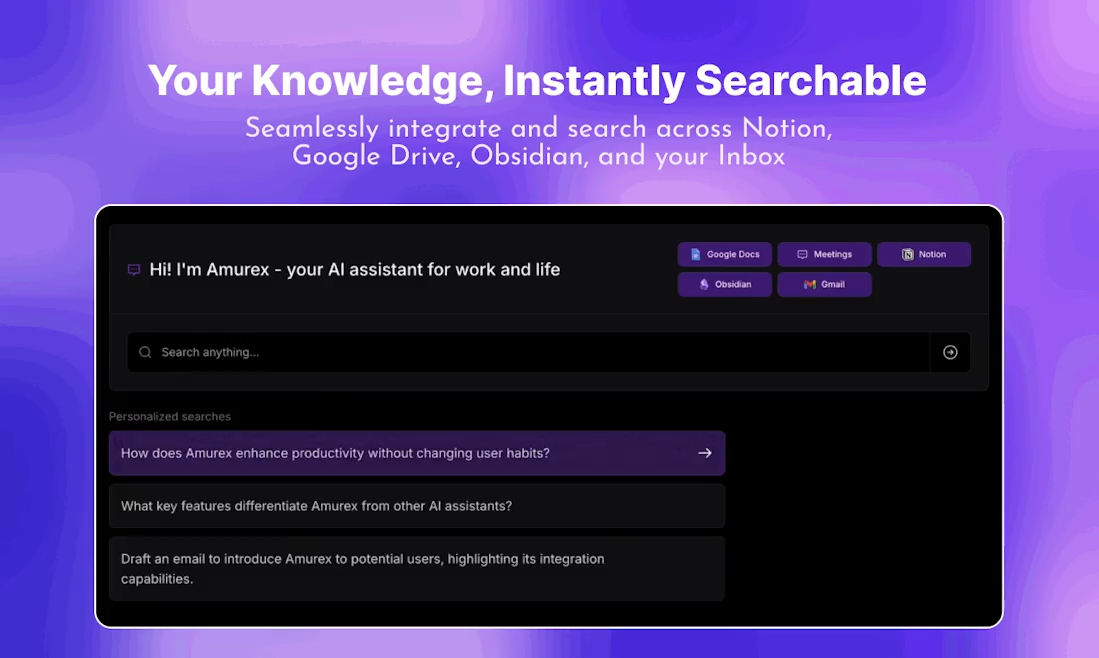
Amurex is an open-source AI assistant from The Personal AI Company that blends two jobs into one product: an in-meeting copilot and a unified knowledge search. During calls on Google Meet or Microsoft Teams it transcribes in real time, surfaces suggestions, generates summaries and action items, offers late-join recaps, and can draft one-click follow-up emails. Separately, its AI Knowledge Search connects tools like Notion, Google Drive, Obsidian, and Gmail so you can retrieve anything across scattered sources from a single search bar.
Its defining trait is openness. The code is published under AGPL-3.0 across separate extension, backend, and web repositories, and the whole stack can be self-hosted for full data control — an appealing pitch for privacy-conscious users and developers who don't want their meeting and document data living in someone else's cloud. It's free either way, whether you install the Chrome extension or run the hosted knowledge search.
The trade-offs are the usual ones for a young, community-driven project. Meeting capture is limited to two platforms, documentation is thin, and self-hosting is genuinely involved. Compared with polished commercial notetakers or knowledge tools, Amurex trades hand-holding and breadth for transparency, control, and price — a reasonable deal for the technically inclined, less so for a team that just wants something that works out of the box.
Key features
- Real-time suggestions and prompts during meetings
- Automatic meeting summaries and action-item extraction
- Live meeting transcription
- One-click AI-generated follow-up emails
- Late-join catch-up recaps
- Unified AI knowledge search across connected tools
- Email inbox categorization
- Open-source, self-hostable backend and web app
Who it’s for
Unified search across Notion, Google Drive, Obsidian, and Gmail from one bar
Capturing meeting notes, summaries, and action items in Google Meet or Teams
Drafting one-click follow-up emails after calls
Catching up quickly after joining a meeting late
Pros & cons
The good
- Fully open source (AGPL-3.0) and self-hostable for complete data control
- Rare combo of a meeting copilot plus unified search across Notion, Google Drive, Obsidian, and Gmail
- Free to use with an active GitHub community of 2.8k+ stars
The catch
- Meeting capture is limited to Google Meet and Microsoft Teams
- Self-hosting is complex and documentation is sparse
- Early-stage and small team; feature depth trails established notetakers
Pricing
| Tier | Price | What you get |
|---|---|---|
| Open Source (Self-hosted) | Free | Full source under AGPL-3.0 · Self-host backend and web app · Complete data control |
| Hosted | Free | Chrome extension via Web Store · Hosted AI Knowledge Search · No setup required |
Free tier — Fully free and open source; self-host at no cost
Alternatives to Amurex
More Productivity →



Questions people ask
Is Amurex free?
Yes. Amurex is open source under the AGPL-3.0 license and free to use, both through the hosted Chrome extension and by self-hosting the backend and web app yourself.
Is Amurex a meeting notetaker or a knowledge search tool?
Both. It started as an AI meeting copilot for Google Meet and Teams (transcription, summaries, follow-up emails) and has expanded into a unified AI knowledge search across tools like Notion, Google Drive, Obsidian, and Gmail.
Can I self-host Amurex?
Yes. The project is split across extension, backend, and web repositories on GitHub, and you can deploy it locally for full data control. Setup is involved and documentation is limited, so it favors technically comfortable users.
Which meeting platforms does Amurex support?
Currently Google Meet and Microsoft Teams, with more platforms listed as coming. It runs as a Chrome/Chromium extension, so it also works in browsers like Edge and Brave.
Who makes Amurex?
Amurex is built by The Personal AI Company, an early-stage team whose stated goal is a 'virtual butler' for personal productivity and knowledge management.