
Dreamina
AI image and video generator
Turn a text prompt into finished images, video, and avatars
Reviewed by The Desk · Last verified July 2026
“Dreamina is a legitimately strong generator riding ByteDance's Seedream and Seedance models, with a rare free tier that's actually usable and a clean handoff into CapCut for editing. The catch is the ByteDance context: watermarks on free output, credit-hungry video, region-scrambled pricing, and recurring billing complaints that make it hard to fully trust with paid or sensitive work.”
Skip it ifSkip it if you need transparent, predictable pricing, airtight commercial licensing, or want to keep your prompts and uploads off a ByteDance-owned platform.
What it is
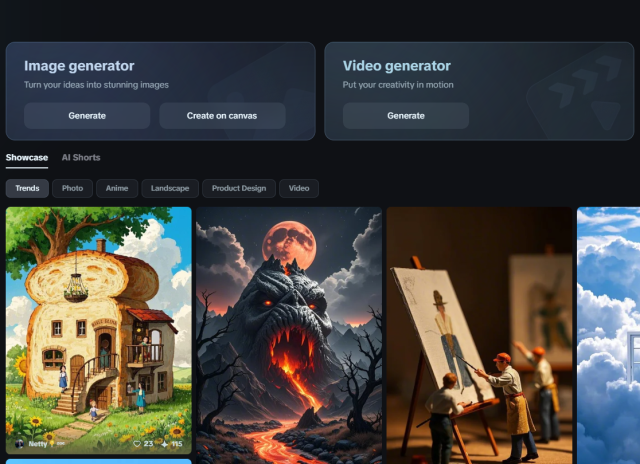
Dreamina is ByteDance's consumer-facing AI creative platform, offered through CapCut at dreamina.capcut.com. It generates images from text prompts, edits and remixes existing images, produces short video clips, and can spin up lip-synced AI avatars. The site's design framing (posters, flyers, logos, a Canvas editor) is real, but it undersells the tool: at its core Dreamina is a broad image-and-video generator rather than a niche graphic-design app.
Under the hood it leans on ByteDance's own models, Seedream for stills and Seedance for motion, which are strong at rendering faces, lighting, and fine detail. Work happens in a browser workspace where you prompt, apply style and reference controls for consistency, refine in a Canvas editor with inpainting, and then hand off to CapCut for actual video editing. A credit system meters everything, and video draws down credits much faster than images.
It fits creators, marketers, and small teams who want a fast prompt-to-publish pipeline and don't want to stitch together separate image, video, and editing tools. The trade-offs are the ByteDance context: watermarks on the free tier, pricing that shifts by region and can be hard to pin down, data-privacy questions for sensitive or commercial work, and a pattern of billing complaints in public reviews. Treat the free tier as a genuinely useful way to evaluate output quality before committing money.
Key features
- Text-to-image and image-to-image generation via Seedream models
- Text-to-video and image-to-video generation via Seedance
- Canvas editor for layout, inpainting, and precise edits
- AI avatars with lip-sync from a photo or script
- Style and reference controls for consistent, on-brand output
- 2K generation, upscaling, and watermark removal on paid plans
- Direct handoff into CapCut for further video editing
Who it’s for
Generate marketing posters, flyers, and social graphics from a text prompt
Produce product-shot style images and mockups without a photoshoot
Animate a still image into a short clip for reels and ads
Create lip-synced AI avatars from a photo or script
Pros & cons
The good
- Genuinely usable free tier (about 225 daily credits) shared across image, video, and avatar tools
- Strong underlying models (Seedream for images, Seedance for video) that render faces, lighting, and detail convincingly
- Smooth prompt-to-publish flow with a Canvas editor and direct handoff into CapCut
The catch
- Free outputs are watermarked and video generation burns credits fast
- Region-dependent pricing plus Trustpilot reports of charges after cancellation
Pricing
| Tier | Price | What you get |
|---|---|---|
| Free | Free | ~225 daily credits · Shared across image, video, and avatar tools · Watermarked output |
| Basic | $18/mo | ~1,010 monthly credits · Watermark removal · Priority queue · Higher-resolution export |
| Standard | $42/mo | ~4,040 monthly credits · All Basic features · Higher usage limits |
| Advanced | $84/mo | ~13,110 monthly credits · All Standard features · Best per-credit value |
Free tier — ~225 free credits per day (roughly 8-10 standard images), watermarked output
Alternatives to Dreamina
More AI Image → IllustraAI4.0Generate editable SVG illustrations from a text prompt in seconds
 Arcade4.4Turn a screen recording into an interactive, trackable product demo
 BannsAi3.9On-brand ad banners from your logo, no designer or prompts
 Midjourney V74.5Class-leading AI image aesthetics with a fast, cheap Draft Mode
Questions people ask
Is Dreamina free to use?
Yes. Dreamina has a free tier that grants roughly 225 credits per day, enough for about 8-10 standard images or a short clip, but free output carries a watermark. Paid plans start around $18/month and remove the watermark while adding credits and priority processing.
Who makes Dreamina?
Dreamina is built by ByteDance, the company behind CapCut and TikTok. It runs at dreamina.capcut.com and integrates with the CapCut editor, using ByteDance's Seedream image models and Seedance video models.
Can I use Dreamina images commercially?
Paid plans remove watermarks, which is the practical baseline for commercial use, but you should read Dreamina's current terms carefully. Licensing language for AI-generated content on ByteDance platforms can be ambiguous, so verify rights before using output in paid campaigns.
Does Dreamina do video as well as images?
Yes. Alongside text-to-image and image editing, Dreamina generates video via its Seedance models (text-to-video and image-to-video) and can create lip-synced avatars. Video generation consumes credits far faster than images.