
IllustraAI
AI vector illustration generator
Generate editable SVG illustrations from a text prompt in seconds
Reviewed by The Desk · Last verified July 2026
“A focused, well-executed niche tool: unlike most AI image generators that only spit out raster PNGs, IllustraAI produces genuinely editable SVG output, which makes it a real time-saver for solo founders and small agencies who need on-brand spot art fast. Just temper expectations — generations are hit-or-miss and you'll spend credits re-rolling to land a usable result.”
Skip it ifYou need pixel-perfect, brand-precise artwork, complex multi-subject scenes, or a design-team workflow with an API and collaboration features — IllustraAI's handful of house styles and inconsistent generations won't replace a human illustrator.
What it is
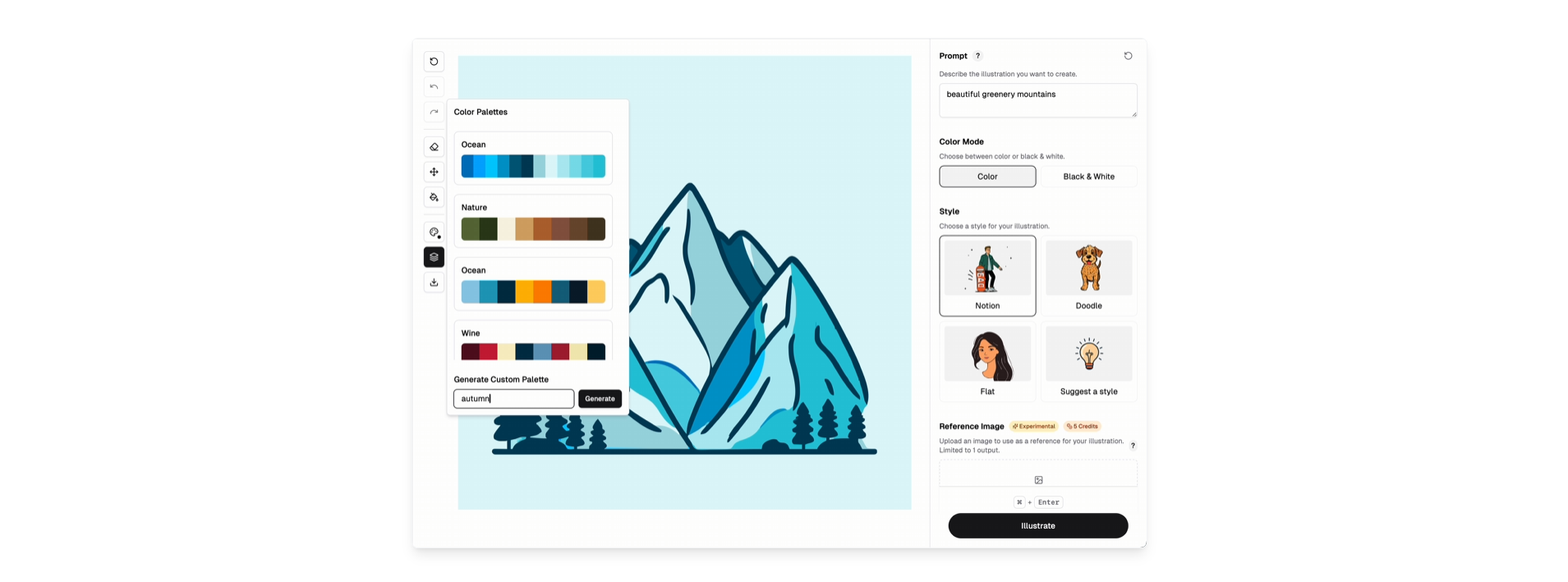
IllustraAI (illustration.app) is a web-based AI tool that turns a text prompt into custom vector illustrations. Its core distinction from mainstream AI image generators is the output format: instead of raster PNGs, it produces editable SVGs that scale cleanly and can be reworked in tools like Figma or Illustrator. You describe what you want, pick from a handful of house styles (Textured Line, Muted Flat, Bold Outline Flat, and others), optionally upload a reference image, and it returns graphics in seconds.
Beyond single generations, it adds a few workflow conveniences: illustration packs that produce 20+ assets in a consistent style, one-click AI animation that converts a still into a GIF, AI upscaling, and free background removal. Pricing is credit-based and one-time rather than a subscription — packs run $9 for 30 credits, $19 for 100, and $49 for 300 — with most actions costing a single credit and GIF animation costing five.
It fits best as a fast, low-cost source of on-brand spot art for indie makers, solo founders, and small agencies who can't justify a designer or a full creative-suite subscription. The trade-offs are the usual ones for a small indie product: generation quality is inconsistent and often needs re-rolls, the style range is narrow enough that outputs can look repetitive, and there's no API, team collaboration, or enterprise support. It complements a design workflow rather than replacing a human illustrator.
Key features
- Text-to-vector generation with genuine editable SVG export
- Multiple built-in illustration styles (Textured Line, Muted Flat, Bold Outline Flat, and more)
- Illustration packs that keep 20+ graphics in a consistent style
- Reference image upload to steer the look of generations
- One-click AI animation that turns a static illustration into a GIF
- AI upscaling plus free background removal
- PNG and SVG output formats
Who it’s for
Create custom hero and spot illustrations for landing pages
Generate a stylistically consistent illustration pack for an app or brand
Produce marketing graphics without hiring a designer or buying stock
Export editable SVGs to refine in Figma or Illustrator
Pros & cons
The good
- Exports true, editable SVG vectors you can refine downstream — not just flat PNGs
- One-time credit packs with no subscription; cheap to start and try
- Style presets and multi-asset packs keep a project visually cohesive
The catch
- Output quality is inconsistent, and complex prompts often need several credit-burning re-rolls
- Limited to a small set of house styles, so results can feel samey across projects
- Small indie product — no API, team features, or enterprise support
Pricing
| Tier | Price | What you get |
|---|---|---|
| 30 credits | $9/mo | One-time purchase · $0.30 per credit · 1 credit per generation, vectorization, or upscale |
| 100 credits | $19/mo | Best value · $0.19 per credit · GIF animation costs 5 credits; background removal free |
| 300 credits | $49/mo | One-time purchase · $0.16 per credit · Lowest per-credit rate for larger projects |
Alternatives to IllustraAI
More Design & UX →


Questions people ask
Does IllustraAI export real, editable SVG files?
Yes. Its main differentiator over typical AI image tools is that it outputs true vector SVGs you can scale infinitely and edit in Figma or Illustrator, alongside PNG and animated GIF.
Is it a subscription or one-time payment?
It uses one-time credit packs, not a recurring subscription: 30 credits for $9, 100 credits for $19 (best value), and 300 credits for $49. Most actions cost 1 credit; GIF animation costs 5, and background removal is free.
Who is IllustraAI best suited for?
Indie hackers, solo founders, and small agencies who need custom spot illustrations for websites, apps, and marketing quickly and cheaply, without hiring a designer or subscribing to a full creative suite.
Can it maintain a consistent style across many illustrations?
Yes. It offers several style presets and an illustration-pack feature that generates 20+ graphics in a cohesive style, which helps when you need a matching set for a single product or brand.