
Langflow
Visual AI agent builder
Drag-and-drop your way to production AI agents and RAG apps
Reviewed by The Desk · Last verified July 2026
“Langflow is the most popular open-source visual builder for LLM agents and RAG pipelines, and the free Desktop app finally strips out the Python-environment friction that kept non-DevOps users away. It is genuinely powerful and free, but big flows get unwieldy and version upgrades have historically broken existing graphs.”
Skip it ifSkip if you want a fully-managed, zero-infrastructure no-code SaaS: you still supply your own LLM keys, vector stores, and hosting, and intricate flows become hard to debug as the node graph sprawls.
What it is
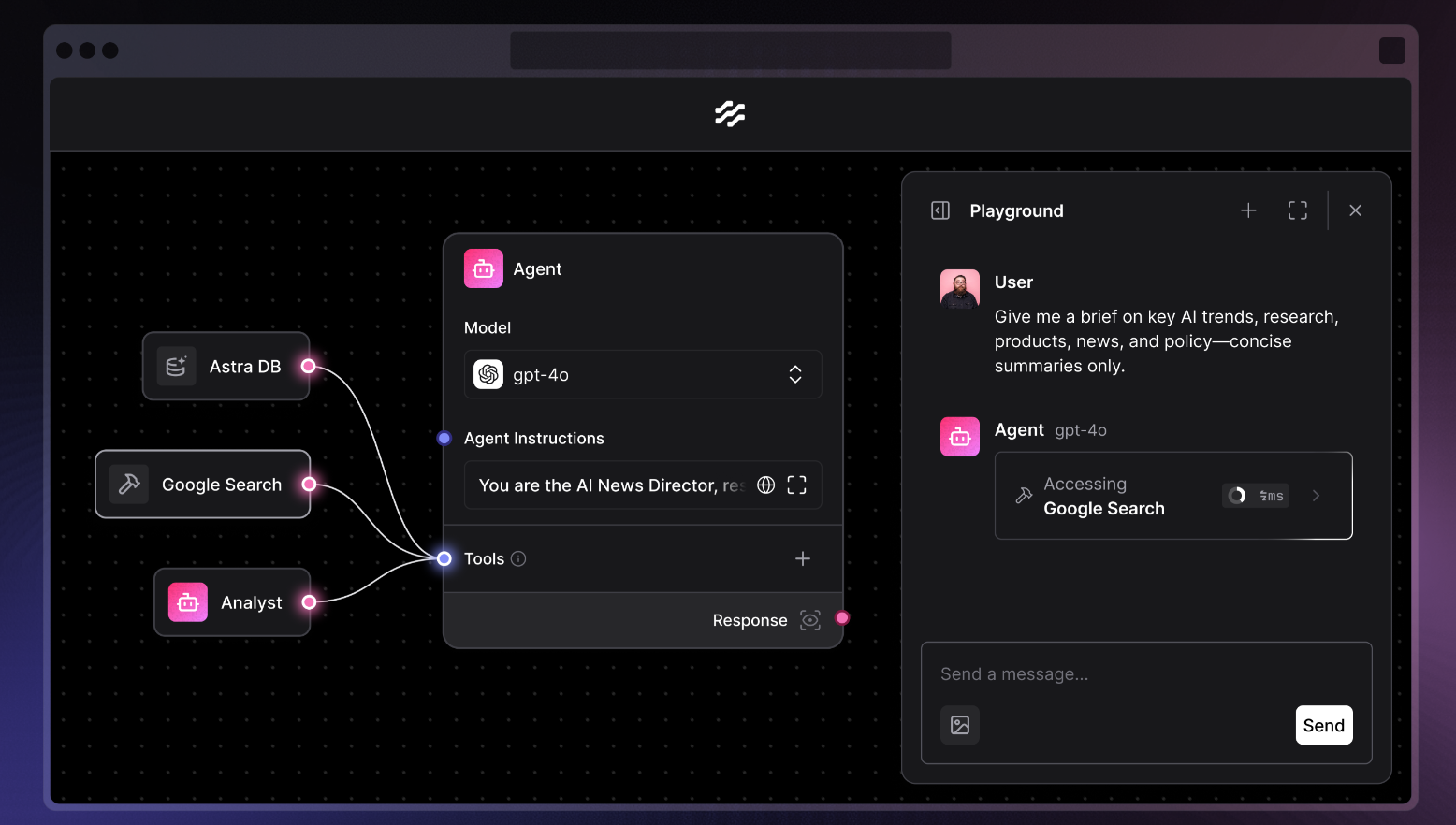
Langflow is an open-source, low-code platform for building LLM-powered agents and retrieval-augmented generation (RAG) applications on a visual canvas. You drag components onto a graph, wire them together, and test the result in an interactive playground before exporting it as JSON, exposing it as a REST API, or running it as an MCP server. It supports the major model providers and vector databases out of the box and, because it is MIT-licensed with the largest community of any visual LLM builder, it doubles as a fast prototyping tool and a customizable foundation you can drop into your own Python.
Langflow Desktop, the offering under review here, is a free Mac and Windows app that bundles every dependency so you can start building without managing Python environments or installing packages. It is the same builder as the self-hosted and cloud versions, just packaged for frictionless local use. The project is backed by DataStax, which was acquired by IBM, giving an open-source tool unusually deep enterprise weight behind it.
The trade-off is complexity. The visual model that makes simple agents quick to assemble becomes harder to read and debug as flows grow into large node graphs, and Langflow has a history of upgrades breaking existing flows. It is best suited to developers and technical teams who want speed and control over a polished but rigid no-code SaaS, and who are comfortable supplying their own model keys, data stores, and deployment target.
Key features
- Visual drag-and-drop canvas for chaining LLM, data, and logic components
- Multi-agent orchestration with supervisor and specialist agents
- RAG pipelines with built-in vector database and embedding components
- One-click deploy of any flow as a REST API or MCP server
- Import/export flows as JSON for versioning and sharing
- Interactive Playground for testing flows before shipping
- Full access to underlying Python for custom components
- Observability integrations with LangSmith and LangFuse
- Desktop app for Mac and Windows with all dependencies bundled
Who it’s for
Prototyping LLM agents on a visual canvas without boilerplate
Building RAG chatbots over your own documents and vector stores
Orchestrating multi-agent workflows with a supervisor and specialists
Shipping a flow as a callable API or MCP server
Pros & cons
The good
- Free and open-source (MIT) with the largest community of any visual LLM builder
- Desktop app bundles every dependency, so you can start on Mac or Windows with no Python setup
- Broad reach: multi-agent orchestration, RAG, all major LLMs and vector DBs, deploy as API or MCP server
The catch
- Complex flows turn into sprawling node graphs that are hard to read and debug
- Stability has been a recurring complaint; upgrades have broken existing flows in the past
- The Desktop app is local and single-user; real deployment still means self-hosting or the paid cloud
Pricing
| Tier | Price | What you get |
|---|---|---|
| Open Source / Desktop | Free | MIT-licensed, self-hosted or local desktop · All core builder, agent, and RAG components · Deploy flows as API or MCP server |
| Cloud | Custom | Hosted, managed Langflow · Free prototyping tier plus paid plans · No infrastructure to manage |
| Enterprise | Custom | Custom pricing via DataStax/IBM · Security and scale features · Support and SLAs |
Free tier — Open-source core and the Desktop app are completely free to self-host; managed cloud adds a free prototyping tier.
Alternatives to Langflow
More Agents & Automation → BrowserAgent3.9Automate the browser with no-code AI agents and no per-run API bills
 ActionKit4.3One API that gives AI agents 1,000+ real integration actions
 Portkey Prompt Studio4.3Build, test and ship prompts across 1,600+ models in production
 MGX4.2Turn a prompt into a shipped app with an AI agent team
Questions people ask
Is Langflow free?
Yes. Langflow is open-source under the MIT license and free to self-host, and the Langflow Desktop app for Mac and Windows is also free. A managed cloud offering adds a free prototyping tier plus paid plans, but you can run the full product at no license cost.
What is Langflow Desktop versus regular Langflow?
Langflow Desktop is a downloadable Mac or Windows app that bundles all dependencies, so you skip Python environment setup and package installs. It is the same Langflow builder, just packaged for easy local use rather than self-hosted on a server or run in the cloud.
Who owns Langflow?
Langflow was created by Rodrigo Nader's team (Logspace) and launched in 2023. Logspace was acquired by DataStax in 2024, and DataStax was subsequently acquired by IBM, so Langflow now sits within the IBM/DataStax portfolio while remaining open source.
Do I still pay for LLMs if Langflow is free?
Yes. Langflow itself is free, but you bring your own API keys for models like OpenAI or Anthropic and your own vector database, so you pay those providers directly plus any hosting costs for self-deployment.
Can I deploy a Langflow flow to production?
Yes. Any flow can be exposed as a REST API or an MCP server, exported as JSON, and self-hosted, or run on Langflow's managed cloud. Note that the Desktop app itself is meant for local, single-user building rather than production hosting.