
Superflex
AI Figma-to-code assistant
Turn Figma designs into framework-matched code inside your IDE
Reviewed by The Desk · Last verified July 2026
“A focused, well-executed Figma-to-code assistant that stands out by matching your existing framework, styling, and components rather than dumping generic markup. Best on clean designs; complex files still need manual polish, and Figma import is a paid feature.”
Skip it ifSkip it if you need pixel-perfect output on complex, deeply nested Figma files with no manual cleanup, or if you work outside VS Code and its forks (there is no JetBrains version) — and note that Figma import itself is gated behind the paid Pro plan.
What it is
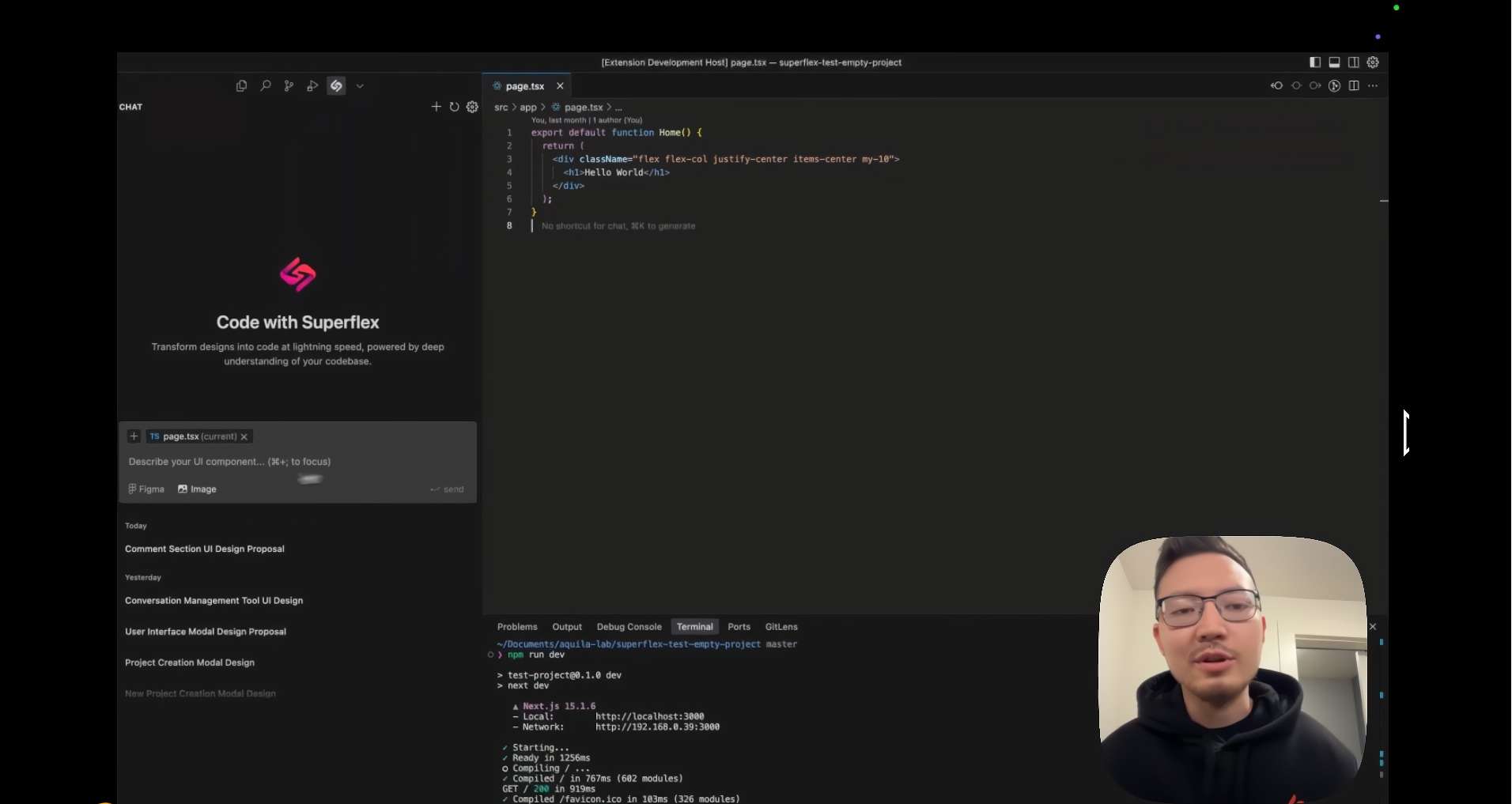
Superflex is an AI frontend assistant that installs as a Visual Studio Code extension (and runs in VS Code forks like Cursor and Windsurf) and turns Figma frames, screenshots, or text prompts into production-ready UI code. It is built by San Francisco-based Aquila Labs and powered by GPT and Claude models, targeting the specific, tedious slice of frontend work: translating a finished design into markup and styles.
Its main differentiator is codebase awareness. Rather than dumping generic HTML, Superflex can scan your repository to match your framework (React, Vue, Angular, or Next.js), your styling approach (Tailwind, CSS, SCSS, or Styled Components), and reuse your existing UI components. Because it works inside the editor, generated code lands directly in your project with no export-copy-paste round trip.
In practice, results are strong on clean, well-structured designs and shakier on complex, deeply nested files, where some manual cleanup is still expected. A free tier (one project with capped premium and basic requests) lets you trial the workflow; Figma import and higher limits sit behind the Individual Pro plan at $12/month billed yearly, with a Team plan around $62 per user per month that adds unlimited requests and zero data retention.
Key features
- Converts Figma designs, screenshots/images, and text prompts into frontend code
- Supports React, Vue, Angular, and Next.js
- Styling via Tailwind CSS, CSS, SCSS, or Styled Components
- Codebase-aware: scans your repo to match coding style and reuse components
- Powered by GPT and Claude models
- Runs as a VS Code extension, compatible with Cursor and Windsurf
- Figma plugin/import pulls design metadata directly into the editor
Who it’s for
Turn Figma mockups into React, Vue, or Angular components without hand-coding markup
Prototype UI quickly from a screenshot or a text prompt
Convert a design system into reusable, styled components that match an existing codebase
Speed up frontend implementation while preserving your team's coding conventions
Pros & cons
The good
- Lives inside VS Code (and forks like Cursor and Windsurf), so output lands straight in your repo with no export-and-paste loop
- Codebase-aware: matches your framework, styling approach (Tailwind/CSS/SCSS/Styled Components), and reuses existing UI components
- Accessible pricing with a genuinely usable free tier; Individual Pro is only $12/month billed yearly
The catch
- Complex or highly custom Figma designs still require manual cleanup, and output quality varies with design structure
- Figma import and higher request limits are locked behind the paid Pro plan
- Frontend-only scope — it generates UI, not backend or application logic
Pricing
| Tier | Price | What you get |
|---|---|---|
| Free | Free | 1 project · 15 premium requests/month · 100 basic requests/month |
| Individual Pro | $12/mo | Up to 3 projects · 500 premium requests/month · Unlimited basic requests · Figma import · Priority email support · Billed yearly |
| Team | $62/mo | Everything in Pro · Unlimited premium requests · Unlimited projects · Zero data retention · Centralized billing · Priority support via Slack Connect · Per user, billed yearly |
Free tier — 1 project; 15 premium + 100 basic requests per month
Alternatives to Superflex
More Coding & Dev →



Questions people ask
What does Superflex actually do?
It is an AI frontend assistant that installs as a VS Code extension and converts Figma designs, screenshots, or text prompts into production-ready UI code, matching your existing framework and styling conventions.
Which frameworks and styling options does it support?
It outputs React, Vue, Angular, and Next.js, and can style components with Tailwind CSS, plain CSS, SCSS, or Styled Components.
Does it work in Cursor?
Yes. It is a VS Code extension, so it also runs in VS Code forks such as Cursor and Windsurf. There is no standalone JetBrains version.
Is there a free plan?
Yes, a free tier gives you one project with 15 premium and 100 basic requests per month. Figma import and higher limits require the Individual Pro plan, which is $12/month billed yearly.
What models power Superflex?
It runs on top of GPT and Claude models to generate code from your designs and prompts.