
Atlas
No-code AI GIS platform
Build interactive maps and spatial dashboards without code
Reviewed by The Desk · Last verified July 2026
“Atlas makes real GIS approachable for non-specialists by wrapping a genuine spatial engine in a no-code, browser-based interface and a prompt-driven AI assistant (Navi). It is a strong, well-designed on-ramp for teams that need spatial answers without hiring a GIS pro, though it is still an early-stage tool that trades some depth for accessibility.”
Skip it ifYou need heavyweight, industry-certified GIS depth — advanced geoprocessing, cartographic precision, or offline desktop workflows — where ArcGIS or QGIS remain far more capable, or your team has little actual spatial data to justify a dedicated mapping tool.
What it is
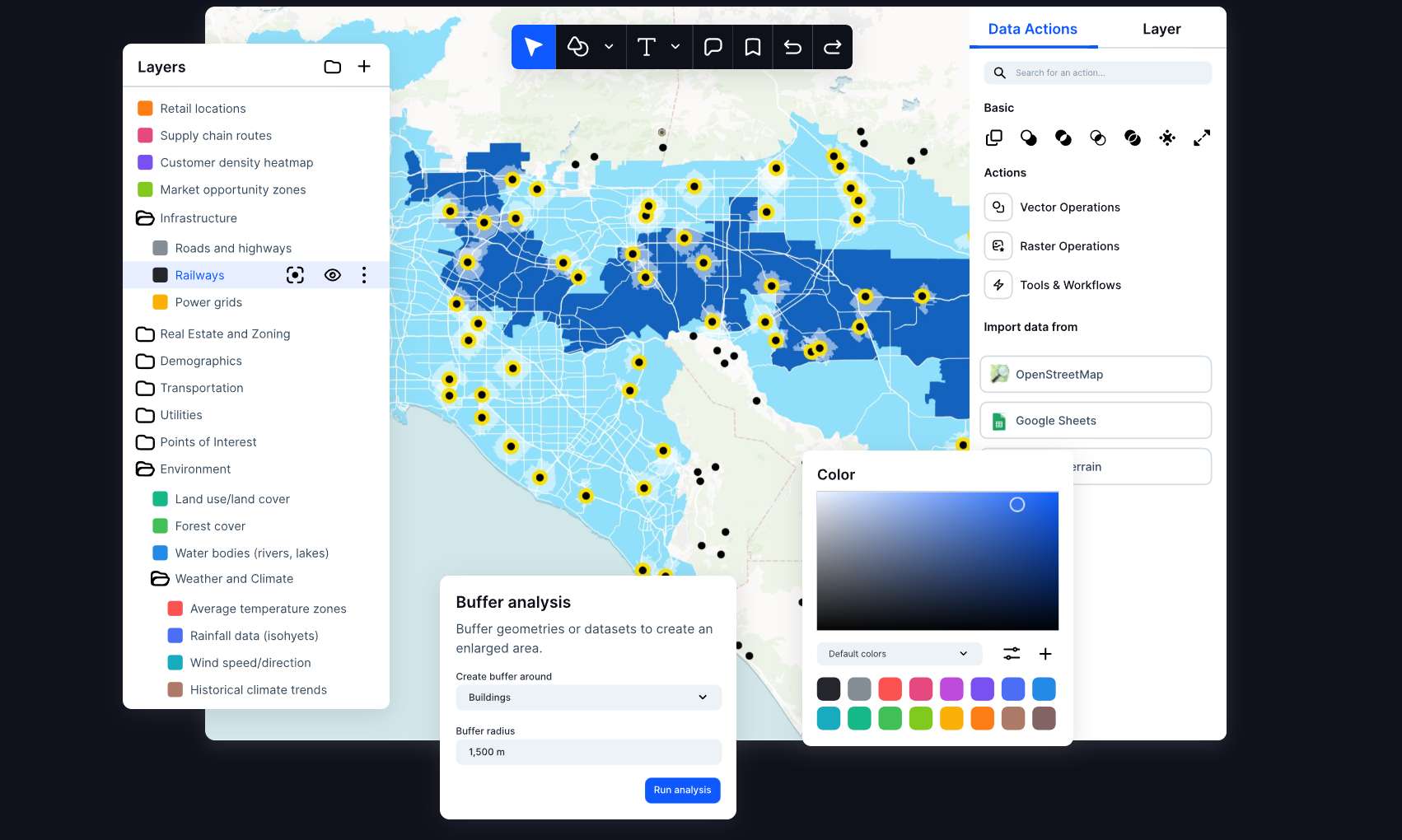
Atlas is a browser-based, no-code GIS platform that lets non-specialists build interactive maps, spatial dashboards, and lightweight geospatial apps. Positioned as an "AI-native GIS," it pairs a genuine spatial engine — real projections, geometry, and spatial analysis across professional formats like Shapefile, GeoJSON, and GeoTIFF — with a conversational assistant called Navi that assembles maps and multi-step workflows from plain-language prompts.
In practice, teams connect data from spreadsheets, PostgreSQL, CSVs, and field reports, run analysis, and publish shareable dashboards and automated reports. It targets energy and infrastructure developers, asset and real-estate managers, field operations, and municipalities — anywhere GIS professionals and non-specialists need to collaborate on the same map. The web-first, real-time collaboration model has earned it the "Figma of geospatial data" label.
Founded around 2021 out of a university project at NTNU and based in Oslo, Atlas is a young, venture-backed company (roughly a $2M pre-seed) with a correspondingly narrow but focused product. Its free tier is generous and Pro pricing is modest at $23 per user per month, making it a low-risk trial. It is not a wholesale replacement for deep desktop GIS, but for teams that need spatial answers without a dedicated specialist, it is one of the more approachable options available.
Key features
- Navi AI assistant that builds maps and multi-step workflows from plain-language prompts
- No-code interface for interactive maps, spatial analysis, and dashboards
- Support for professional GIS formats: Shapefile, GeoJSON, GeoTIFF, KML, GPKG
- Live data connections to PostgreSQL, Google Sheets, and CSV imports
- Real-time collaboration and shareable, embeddable maps
- Automated reporting, alerts, and scheduled status updates
- Geocoding and template library for common use cases
Who it’s for
Site selection and suitability analysis for real estate or energy projects
Field inspections and asset-management dashboards
Turning spreadsheets and PostgreSQL data into interactive maps
Spatial analysis for teams without a dedicated GIS specialist
Pros & cons
The good
- Puts real GIS (projections, geometry, spatial analysis, pro formats) within reach of non-specialists through no-code and conversational AI
- Browser-based, Figma-style collaboration with live data connections to PostgreSQL, Google Sheets, and CSV
- Generous free tier plus an affordable $23/user Pro plan lowers the barrier to trying spatial workflows
The catch
- Young, small startup (founded ~2021, ~$2M pre-seed) — less proven and less deep than incumbent GIS platforms
- AI and workflow usage are metered by credits and run limits, so heavy use pushes you into higher tiers
- Narrow appeal: only worth it for teams that genuinely work with location or map data
Pricing
| Tier | Price | What you get |
|---|---|---|
| Starter | Free | Up to 3 projects · 3 editors · 1 GB storage · 10 Navi AI runs · Community support |
| Pro | $23/mo | Up to 10 projects · 10 GB storage · 20,000 AI credits · Export to image/PDF · Embed without logo |
| Team | $72/mo | $72/editor + $7/viewer per month · Unlimited projects · Shared datasets · Project-level permissions · Password-protected sharing |
| Enterprise | Custom | Custom pricing · Unlimited storage and workflow runs · White-label embeds · Dedicated success manager · Training and onboarding |
Free tier — Starter: 3 projects, 3 editors, 1 GB storage, 5,000 geocoding runs, 20 workflow runs, 10 Navi AI runs
Alternatives to Atlas
More Data & Analytics → Base444.3Describe an app in plain English and get a working full-stack product
 Metabase Embedded Analytics4.4Embed customer-facing analytics in your app, no BI build required
 Streamoku3.9Host Streamlit apps without touching DevOps
 Bolt.new4.4Prompt to a live full-stack web app in your browser in minutes
Questions people ask
Is Atlas really no-code?
Yes. You build maps, run spatial analysis, and create dashboards through a visual interface, and the Navi AI assistant can generate maps and workflows from plain-language prompts. No scripting is required, though technical users can still connect databases and APIs.
Does Atlas replace ArcGIS or QGIS?
Not for advanced work. Atlas covers a lot of everyday spatial analysis with far less friction, but established desktop GIS platforms remain deeper for heavy geoprocessing, cartographic precision, and offline workflows. Atlas is best as an accessible complement or entry point.
Is there a free plan?
Yes. The Starter tier is free forever and includes up to 3 projects, 3 editors, 1 GB of storage, and a limited allotment of geocoding, workflow, and Navi AI runs. Paid plans start at $23 per user per month.
What data can I bring into Atlas?
Atlas supports professional GIS formats such as Shapefile, GeoJSON, GeoTIFF, KML, and GPKG, and connects to live data sources including PostgreSQL, Google Sheets, and CSV files.